Home › How to use it
How to use it
How to Use a Starlink Referral Code, Screen by Screen
There is no box for the code. You open the referral link, order in that tab, and check the green panel before you pay.
Starlink’s pages last read .
The short version
A Starlink referral code is used by opening a link, not by typing. The referral code is the RC- part of the link itself; starlink.com reads it from the address bar when the link opensour reading[S]. From there the order is the normal starlink.com order: address, plan, kit, order summary, payment. The one extra job is to read the order summary before you pay and find the green panel that says “Referral Code Applied[S]”.
Our read of the order flow on Nov 16, 2026: there is no box anywhere in the order flow for typing a referral codeour reading[S]. So if you are hunting for a field, stop looking; the code and the link are the same thing, and the link is the only route Starlink counts; the terms allow no other way to attach a referral[T].
Before you open the link
Four things decide whether the referral counts, and all four are settled before the first screen.
Check these first
- You are new to Starlink. Only a first-time Starlink customer qualifies; anyone with a current or past account is out[H]. Don’t sign in to an old account, and don’t let the browser do it for you.
- The service address is in the US. The service address must be in the same country as the person who shared the link, so this link needs a US address[T].
- The order itself happens on starlink.com. Only orders placed on starlink.com count; kits from stores, resellers and account transfers earn nothing[H]. A store kit can’t be attached to a referral later, however you activate it.
- One tab, start to finish. The referral sits in that one browser tab’s session storage and is gone once the tab closesour reading[S]. Don’t finish in the Starlink app, another browser or a bookmark.
Every rule, with Starlink’s own sentence next to it, is on the eligibility page. If one of the four doesn’t fit you, the credit isn’t available to you; the walkthrough below still shows what the order screens look like. If all four fit, open the link and keep going in the tab it opens.
Referral link: this button opens starlink.com with the site owner’s referral code already in the address. The site owner gets a reward if you order through it. New US customers who order the kit and plan on starlink.com get $100 after two months subscribed, if you qualify, as Starlink states it, and the owner gets the same. Starlink Referral Code US is independent of SpaceX and Starlink.
Open starlink.com with the referral link (new tab: starlink.com)Checkout walkthrough
The five starlink.com screens, one at a time
Dated screenshots of a real order page (nothing was bought), what to check on each screen, and what to do when the green panel isn’t there. Without JavaScript it reads as a plain list of all five.
Screen 1 of 5address
Enter your service address
What to check
- The address bar still reads starlink.com with ?referral= and the RC- code after it.
- Type the US address where the dish will live; Residential prices depend on it.
- Stay in this tab: nothing else needs to be open.
Sources: starlink.com shows Residential plans and your price only after a service address is entered, and the price depends on the address[S].
I don’t see the green panel
No panel yet is normal here
- The panel belongs to the order summary, two screens on. Keep going.
- If the address bar lost the ?referral= part, go back to the page you came from and open the referral link again.
Screen 1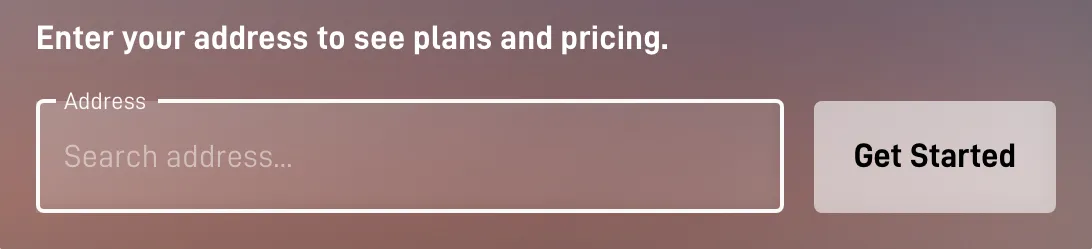
Screen 1: enter your service address. Screenshot of starlink.com, taken Oct 30, 2026. Prices and wording there change with address, plan and time. Screen 2 of 5plan
Pick a plan
What to check
- Residential for a fixed home, Roam for travel: every Residential and Roam tier is in Starlink’s eligible list.
- The price shown is for your address; Starlink does not publish which level an address gets.
- Business, Priority and Enterprise plans earn no referral reward.
Sources: every Residential tier (100 Mbps, 200 Mbps, Max, plus legacy Residential and Residential Lite) and all three Roam plans (100GB, 300GB, Unlimited)[H]; Starlink’s own US price data since Oct 29, 2026 shows Residential 100 Mbps at $44 to $55, 200 Mbps at $68 to $85 and Max at $104 to $156 a month, with no public rule for which level an address gets[S]; the account must belong to a person; Business, Enterprise and Priority accounts earn no referral reward[T].
I don’t see the green panel
No panel yet is normal here
- The panel shows on the order summary, after the kit choice.
- Still in the same tab? Then the code is still with you. If you closed it, open the referral link again and start over.
Screen 2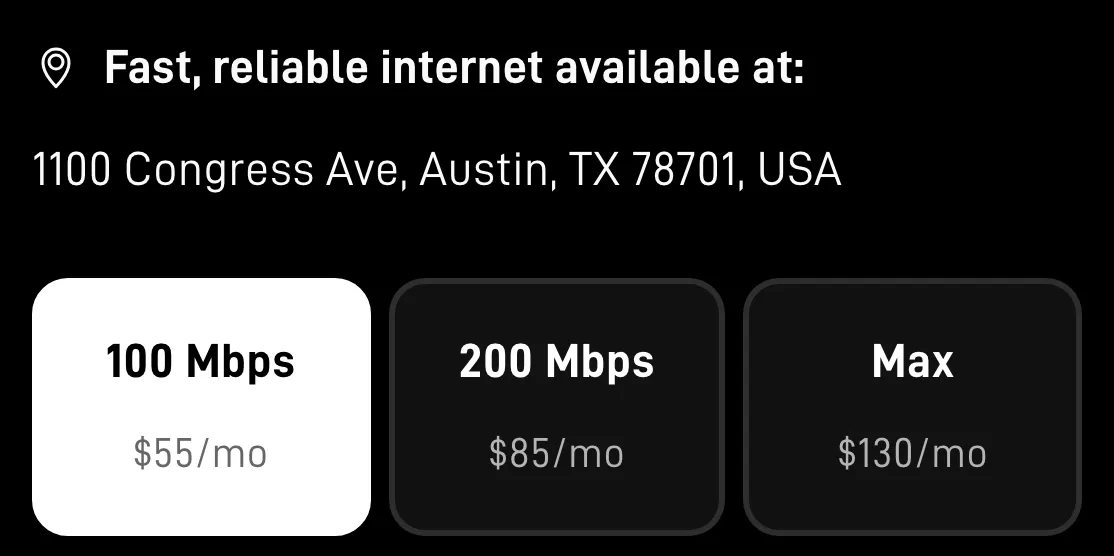
Screen 2: pick a plan. Screenshot of starlink.com, taken Oct 30, 2026. Prices and wording there change with address, plan and time. Screen 3 of 5kit
Choose the kit and how to pay for it
What to check
- Buy or rent as offered at your address; Starlink has not said whether a rented kit earns the credit.
- The Mini has a one-time price or installments; the Standard kit is bought outright where offered.
- Kits from stores and resellers never carry a referral, however you activate them.
Sources: a Standard kit costs $349 to buy and a Mini $149; where an address is offered a rental instead, the national list showed the kit at $0, a $99 installation add-on, or $199 for a rental with professional installation[S]; Starlink’s rental article says a monthly rental fee is charged on top of the service price, while one test address showed $0 a month on Oct 30, 2026; your checkout screen is the only place to read yoursunverified[H]; the terms speak of buying the kit and plan on starlink.com, and Starlink has not said whether a rented kit countsunverified[T]; only orders placed on starlink.com count; kits from stores, resellers and account transfers earn nothing[H].
I don’t see the green panel
No panel yet is normal here
- One more screen: the order summary is where it appears.
- Don’t switch to the Starlink app or another browser; the code lives in this tab only.
Screen 3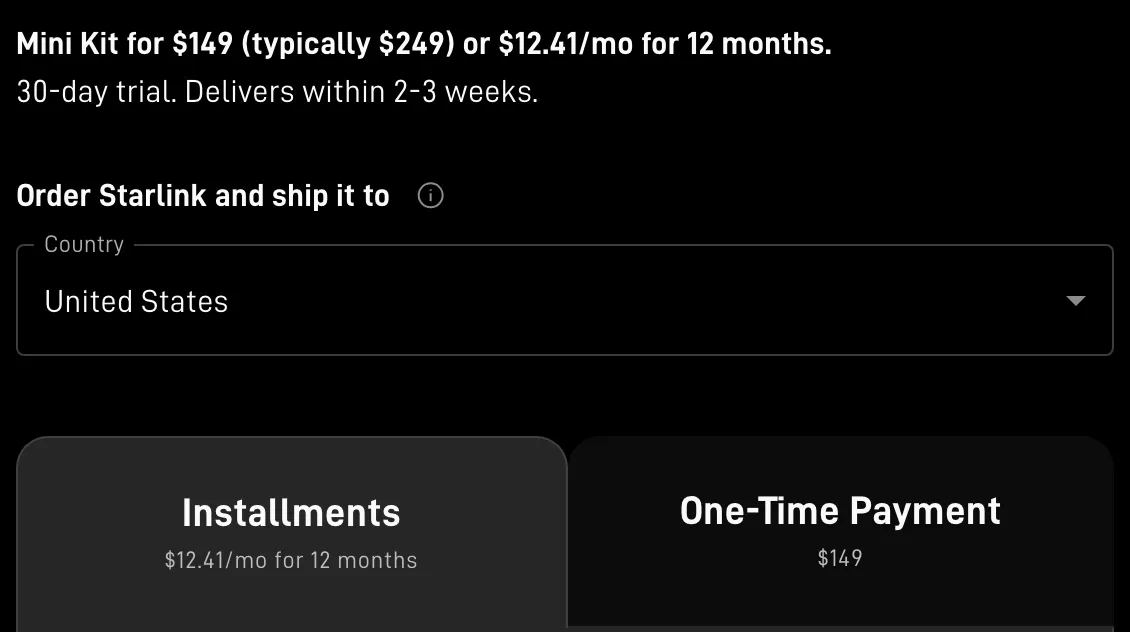
Screen 3: choose the kit and how to pay for it. Screenshot of starlink.com, taken Oct 30, 2026. Prices and wording there change with address, plan and time. Screen 4 of 5summary
Read the order summary and find the green panel
What to check
- A green panel reading “Referral Code Applied” sits by the Checkout button (under it on a computer, above it on a phone).
- The total due today is the kit, shipping, tax and any surcharge: no referral money comes off here.
- An amber “Referral Code Not Applied” panel, or no panel at all, means stop before paying.
Sources: Referral Code Applied[S]; Referral Code Not Applied[S]; the first month is paid in full at the normal price; nothing comes off the checkout total for the referral[H].
I don’t see the green panel
Fix it now, before Checkout
- Open the referral link again in this same browser and redo the address, plan and kit in the tab it opens.
- Don’t sign in to an old Starlink account: only a new customer qualifies.
- A note that the referral doesn’t cover this order type means the plan isn’t eligible; pick a Residential or Roam plan or order without the credit.
- Don’t pay first and sort it out later: a referral missing at the order can’t be added afterwards.
Referral link: this button opens starlink.com with the site owner’s referral code already in the address. The site owner gets a reward if you order through it. New US customers who order the kit and plan on starlink.com get $100 after two months subscribed, if you qualify, as Starlink states it, and the owner gets the same. Starlink Referral Code US is independent of SpaceX and Starlink.
Open the referral link again (new tab: starlink.com)Screen 4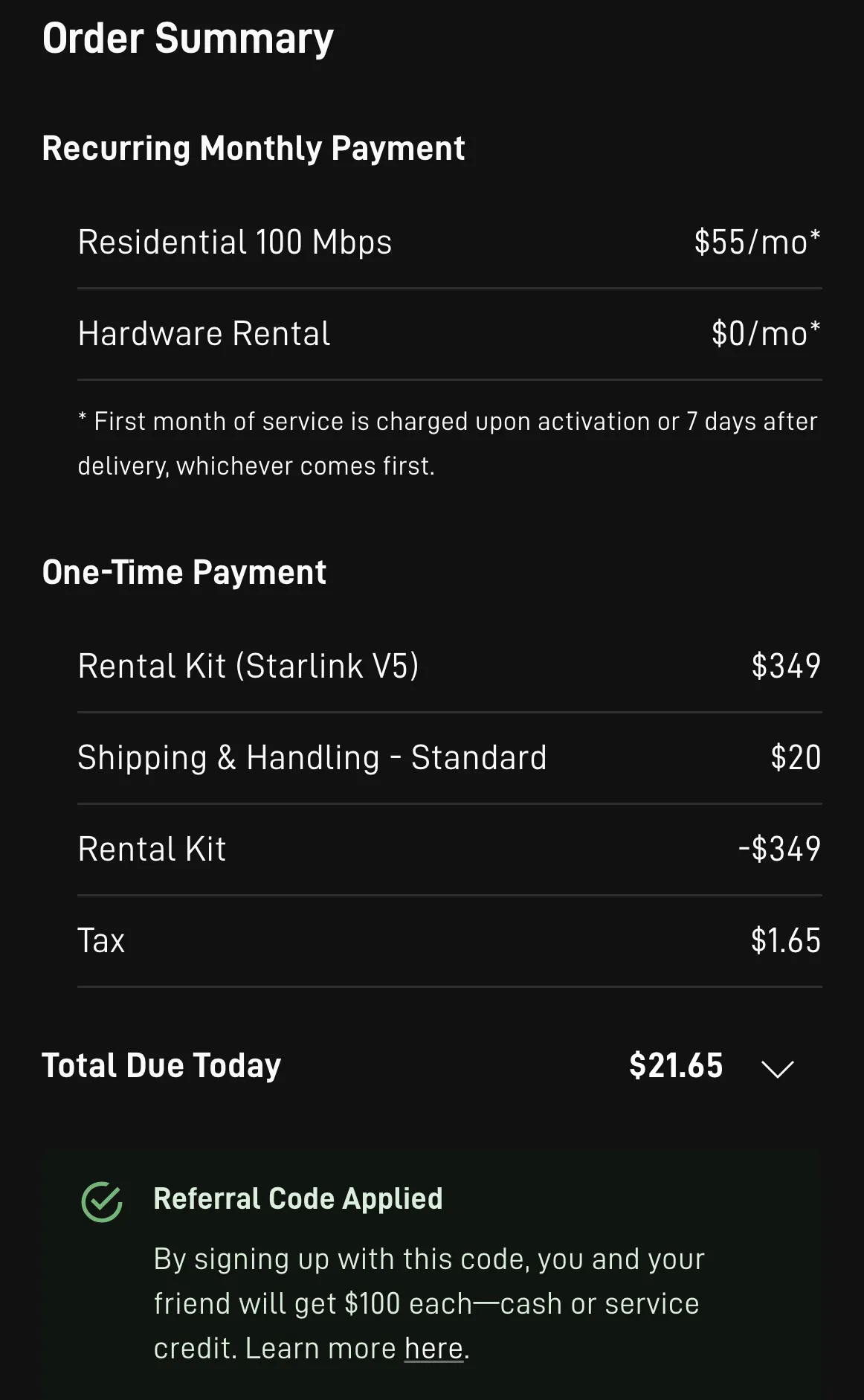
Screen 4: read the order summary and find the green panel. Screenshot of starlink.com, taken Oct 30, 2026. Prices and wording there change with address, plan and time. Screen 5 of 5payment
Pay
What to check
- Pay in this same tab. The panel wording above is what you should have seen a moment ago.
- The first month bills in full; the credit lands on a later invoice, not on today’s total.
- Nothing more to type: there is no code box after payment either.
Sources: the first month is paid in full at the normal price; nothing comes off the checkout total for the referral[H]; applied on the second monthly subscription invoice[T]; there is no box anywhere in the order flow for typing a referral codeour reading[S].
I don’t see the green panel
Already paid without the panel?
- Starlink says a referral missing at the time of the order can’t be attached later, so there is nothing to fix on this order.
- Your kit, plan and price are unaffected; the credit can’t be added to this order, and Starlink alone decides what counts.
Screen 5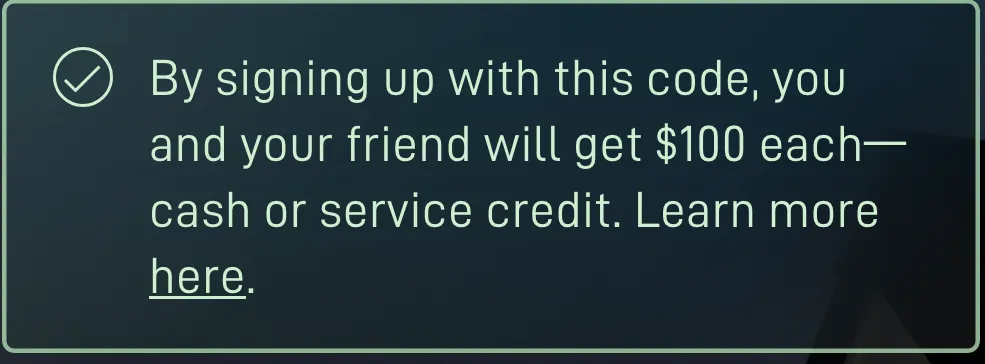
Screen 5: pay. Screenshot of starlink.com, taken Oct 30, 2026. Prices and wording there change with address, plan and time.
What the green panel means, and what the amber one means
The panel is the only confirmation starlink.com gives, and it only appears on the order summary, the screen before payment. On a computer it sits under the Checkout button; on a phone, above it. Green “Referral Code Applied[S]” means the code from the link is on this order. Nothing else on the screen changes: the total due today is still the kit, shipping, tax and any demand surcharge, because the first month is paid in full at the normal price; nothing comes off the checkout total for the referral[H].
Two other states exist, and both mean don’t pay yet.
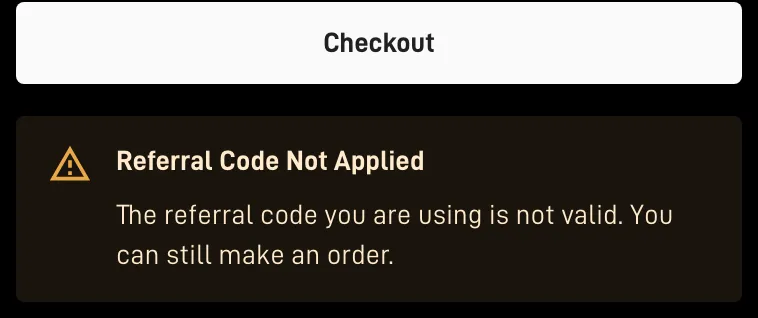
The amber panel carries one of two messages: a message that the code isn’t valid, with the order still allowed to go through[S], or a message that the referral doesn’t apply to this order type, so the order completes with no reward[S]. No panel at all means the tab lost the code or never had it. In every case the fix is the same, and it has to happen before Checkout: open the referral link again in the same browser and redo the address, plan and kit in the tab it opens. The reason it can’t wait: a referral that wasn’t on the order can’t be added afterwards[H]. Every cause we know, and its fix →
Three ways people lose the referral
Waiting until activation
The most common one. People buy the kit on starlink.com without the link, planning to “enter the code” when the dish arrives and they set it up. There is no such step: there is no box anywhere in the order flow for typing a referral codeour reading[S], and a referral that wasn’t on the order can’t be added afterwards[H]. The link has to be open before the address screen, not after the box arrives.
Buying the kit in a store
No store or reseller kit can carry a referral: only orders placed on starlink.com count; kits from stores, resellers and account transfers earn nothing[H]. A store kit activates normally and works normally; it just earns no credit, for you or for anyone.
Finishing the order somewhere else
The code travels with one browser tab: the referral sits in that one browser tab’s session storage and is gone once the tab closesour reading[S]. Switching to the Starlink app, a second browser or a bookmarked starlink.com page starts a fresh order without it. If you have to stop and come back later, open the referral link again when you return and start from the address.
After you pay
Nothing more to type and nothing to confirm with us: the referral is recorded by starlink.com at the order, and this site never sees it. The money arrives later, on Starlink’s schedule, not at checkout.
- First billService billing starts at activation, 7 days after delivery, or 30 days after shipping when no delivery date exists, whichever comes first[ToS]. The first month is paid in full.
- Second bill: the $100Starlink’s terms: applied on the second monthly subscription invoice[T]. Its help center: issued as soon as 60 days after activation, depending on country, account settings and an identity check[H]. It arrives as service credit on the Starlink account unless the account is set to cash[T].
- Staying subscribedStarlink requires two full monthly billing cycles, paid and in good standing on a full-speed plan, before the referral counts; time in Standby Mode doesn’t count toward them[T].
Timing in detail, including the cash option: when Starlink pays the $100. And one reassurance, since people ask: the link only pre-fills the code on starlink.com. Your card details go to Starlink, as on any other order, and never to this site.
Sources for this page (6)
- starlink.com page code for referral handling (looked up, nothing ordered) (starlink.com/), last read Oct 21, 2026
- US referral terms (Oct 7, 2026 version) (new tab), last read Nov 16, 2026
- Help center: the referral program article (new tab), last read Nov 23, 2026
- starlink.com national order list, no address entered (looked up, nothing ordered) (starlink.com/residential), last read Nov 16, 2026
- Help center: rental kits (new tab), last read Nov 16, 2026
- US terms of service (new tab), last read Nov 3, 2026
Markers: [T] Starlink’s referral terms, [ToS] its terms of service, [H] its help center, [S] starlink.com pages or page code, [P] press reports.