Home › Not applied?
Not applied?
Starlink Referral Code Not Applied? Fix It Before You Pay
A missing or amber panel on the order summary has a handful of causes. All of them are fixable before you pay, and none after.
Starlink’s pages last read .
First, which of the three states do you see?
On starlink.com the order summary is the last screen before payment, and it is the only place the referral shows at all. It can look three ways:
- A green panel reading “Referral Code Applied[S]”. The referral is on the order. Pay in this tab and you are done; when the $100 is paid covers what happens next. The wording is what the dated screenshots on this site show, and Starlink can change it.
- An amber panel reading “Referral Code Not Applied[S]”. Starlink saw a code but didn’t accept it. The sentence under the heading says why: either a message that the code isn’t valid, with the order still allowed to go through[S], or a message that the referral doesn’t apply to this order type, so the order completes with no reward[S].
- No panel at all. Starlink saw no code with this order. The screen looks like any other order, which is why people pay and only notice later.
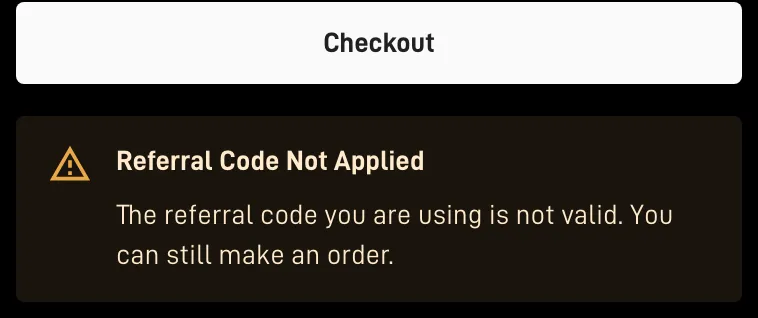
Don’t pay yet if the panel is amber or missing.
Starlink’s help center: a referral that wasn’t on the order can’t be added afterwards[H]. Every fix below takes a minute; paying first takes the option away.
The causes, and the fix for each
Some of these you can fix in the same browser. Two of them (an old account, a store kit) have no fix, and this page says so instead of sending you back to the link.
You closed the tab, switched browsers, or moved to the Starlink app
The most common cause. The referral sits in that one browser tab’s session storage and is gone once the tab closesour reading[S]. If you opened the link on your phone and finished on a laptop, or opened the app to order, the code never came along.
Fix: open the referral link again and do every screen, from the address to payment, in the tab it opens. Don’t sign in on another device halfway through.
You looked for a box and typed the code somewhere
There is nowhere to type it: there is no box anywhere in the order flow for typing a referral codeour reading[S]. The referral code is the RC- part of the link itself; starlink.com reads it from the address bar when the link opensour reading[S]. A code pasted anywhere else does nothing, and the link is the only route Starlink counts; the terms allow no other way to attach a referral[T].
Fix: stop looking for the box. Open the link, and let the address bar carry the code. Code vs link explains why every “code” site hands you a link.
The link was retyped, shortened or cut
A code copied by hand often loses a character, and starlink.com then shows the amber panel with the “not valid” sentence.
Fix: don’t retype anything. Open the full link from a button or a pasted URL that still ends in the complete RC- code (the format is RC-XXXXXXX-XXXXX-XX, letters and digits). If a friend sent you their link, ask them to copy it again from the Referrals section of their Starlink account.
The order type isn’t eligible
The amber panel’s second sentence, a message that the referral doesn’t apply to this order type, so the order completes with no reward[S], means the plan or account type is outside the program. Starlink’s eligible list is every Residential tier (100 Mbps, 200 Mbps, Max, plus legacy Residential and Residential Lite) and all three Roam plans (100GB, 300GB, Unlimited)[H]. On the other side, the account must belong to a person; Business, Enterprise and Priority accounts earn no referral reward[T].
Fix: go back to the plan screen and pick a Residential or Roam plan on a personal account, then check the summary again. If you need a Business or Priority plan, order it; the referral simply doesn’t apply, and nothing on the plan is wrong.
Not settled: the terms speak of buying the kit and plan on starlink.com, and Starlink has not said whether a rented kit countsunverified[T]. If your address offers only the rental and the panel is green, the order went through with the code; whether the reward follows is Starlink’s call.
You signed in to an existing or old Starlink account
No fix exists for this one. Only a first-time Starlink customer qualifies; anyone with a current or past account is out[H]. Signing out and ordering under a new email at the same address is not a route this site suggests: the rule is about the person, not the login, and SpaceX alone decides whether a referral qualifies, and it can withhold, delay or reverse a reward[T].
If this is you, order the way that suits you and skip the referral.
The kit came from a store or a marketplace
Also no fix. Only orders placed on starlink.com count; kits from stores, resellers and account transfers earn nothing[H]. Activating a store kit on starlink.com, with or without a referral link, records nothing, because a referral is recorded only when the new customer orders on starlink.com through the unique link[H].
Redo the order the right way
For the fixable causes above, the sequence is the same:
- Open the referral link in the browser you will finish in. Check that the address bar still shows
?referral=followed by the code. - Enter the US service address in that tab.
- Pick a Residential or Roam plan on a personal account.
- Choose the kit as offered at the address.
- On the order summary, find the green “Referral Code Applied[S]” panel by the Checkout button. Only then pay. The first month is paid in full at the normal price; nothing comes off the checkout total for the referral[H].
Every screen with a dated screenshot is on the how-to page, and the walkthrough on the home page steps through them one at a time.
Referral link: this button opens starlink.com with the site owner’s referral code already in the address. The site owner gets a reward if you order through it. New US customers who order the kit and plan on starlink.com get $100 after two months subscribed, if you qualify, as Starlink states it, and the owner gets the same. Starlink Referral Code US is independent of SpaceX and Starlink.
Open the referral link again and redo the order (new tab: starlink.com)Already paid without the panel?
Then there is nothing to fix on this order, and this page won’t pretend otherwise. Starlink is plain about it: a referral that wasn’t on the order can’t be added afterwards[H]. Support can’t attach a code afterwards either, because a referral is recorded only when the new customer orders on starlink.com through the unique link[H].
Your kit, plan and price are unaffected; the only thing missing is a credit you were never charged for. Starlink’s return policy is the same for every order (a kit bought on starlink.com can go back undamaged within 30 days of the Payment Due Date for a full refund; a rented kit gets only the activation price back[ToS]); nothing in it mentions referrals, and this site doesn’t suggest sending back a working kit to chase a credit. Starlink alone decides what counts: SpaceX alone decides whether a referral qualifies, and it can withhold, delay or reverse a reward[T].
As a customer you now have your own link under Referrals in your account; who qualifies lists the rules the people you share it with will need to meet.
Sources for this page (4)
- starlink.com page code for referral handling (looked up, nothing ordered) (starlink.com/), last read Oct 21, 2026
- US referral terms (Oct 7, 2026 version) (new tab), last read Nov 16, 2026
- Help center: the referral program article (new tab), last read Nov 23, 2026
- US terms of service (new tab), last read Nov 16, 2026
Markers: [T] Starlink’s referral terms, [ToS] its terms of service, [H] its help center, [S] starlink.com pages or page code, [P] press reports.